Table of contents
For the unfamiliar, a lanyard card sounds like a simple affair. In reality, it’s a loose phrase people use when they’re trying to describe a card or pass that’s worn on a lanyard—and any number of different suppliers mean different things by it.
In the UK, lanyard card usually points to ID, access and event cards (staff IDs, visitor badges, conference passes). But you’ll also see it used for support or awareness cards and pocket reference attachments that clip to a lanyard in healthcare and training environments.
This comprehensive guide keeps it practical. We’ll help you choose the right card and size, and the right way to carry it without getting dragged into confusing jargon. We’ll cover common sizes (CR80/ID‑1, A7/ID‑2, A6), the main card types, materials and print choices that affect durability and readability, and the carry methods (slot‑punched, wallet, pouch) that make the whole setup work.


Choose your lanyard card setup quickly and easily
If you just want the quick answer you can find it here. These combinations cover the majority of real‑use scenarios and help keep you out of the usual pitfalls.
| What you’re doing | Best starting size | Best card type | Best carry method | Top features |
| Staff ID / daily workplace use | CR80 (ID-1) | PVC ID card | Slot-punched or slim holder | Lowest bulk, highest durability |
| Access control (swipe/RFID) | CR80 (ID-1) | PVC access card | Holder recommended | Reduces wear and cracking |
| Conference / exhibition | A7 (ID-2) | Printed insert (laminated) | Wallet | Easy reprints + visible branding |
| High-visibility crew/backstage | A6 | Printed insert (laminated/synthetic) | Wallet or pouch | Bigger read distance |
| Outdoor / wet environment | A6/A7 | Synthetic insert | Sealed pouch | Weather protection |
| Reference cards (clinical/training) | Small multi-card set | Wipe-clean reference cards | Clip + holder | Designed for quick lookup |
Widely used lanyard sizes in width and length
Most results in Google for lanyard size are full of filler because pages confuse lanyard strap dimensions with card dimensions. It’s important to note here that card size determines the wallet or holder, while lanyard size determines comfort, visibility, branding space and safety.
Standard lanyard widths
| Width | Typical use | Why you’d choose it |
| 10 mm | minimal branding, light daily wear | slim and discreet |
| 15 mm | most workplace IDs | balanced comfort + visibility |
| 20 mm | events, visitor passes, higher visibility | more branding area, easier to spot |
| 25 mm | bold branding, high-profile events | maximum visibility and print area |
Typical lanyard lengths
| Length (circumference) | Typical use | Notes |
| 80–85 cm | youth / smaller wearers | reduces swinging and snagging |
| 86–97 cm | standard adult lanyards | most common range |
Safety note: For many workplaces, schools and healthcare, a breakaway is a sensible default. The right length is the one that’s safe for the environment.
Quick card size matching tips
As a rule, CR80 staff ID cards feel right on 15–20 mm lanyards. A6 or A7 event passes usually look and wear better on 20–25 mm lanyards because the pass is visually larger, so a very narrow strap can feel under‑specced. If you’re adding reels, double clips or heavier fittings, moving up a width often makes the whole thing more comfortable.

Common lanyard card sizes include CR80 / ID‑1 60 × 53.98 mm, A7 / ID‑2 74 × 105 mm & A6 105 × 148 mm.
Common lanyard card sizes
Most lanyard cards fall into a small set of familiar sizes. Choosing the right one is less about ‘what’s standard’ and more about how the card will be used (daily access vs. short‑term event, how much information needs to fit and whether it will be scanned).
Rule of thumb: If it needs to survive everyday wear, start with CR80/ID‑1. If it needs to be read from a distance or changed at speed, start with A7/A6 inserts.
CR80 / ID‑1 (credit card size)
- Dimensions: 60 × 53.98 mm.
- Best for: Staff ID, access control, everyday workplace use.
This is the everyday workhorse: compact, lightweight, and ideal for a clean name and photo, role and ID number. It’s also the most common format for access cards (swipe/RFID/NFC).
Good to know: CR80 lanyard cards are often slot‑punched (single or double slot) or used with a slim holder to reduce cracking.
A7 / ID‑2 (event pass size)
- Dimensions: 74 × 105 mm (A‑series paper size). ID‑2 cards are 105 × 74 mm — the same size, just rotated.
- Best for: Conferences, exhibitions, visitor passes.
If you need something readable at a glance, A7 is a safe default. It gives you enough space for branding, names/roles and a QR code without squeezing everything into postage‑stamp proportions.
Good to know: Many A7 wallets are sold by insert size (portrait vs landscape). Always check what the wallet is designed to fit.
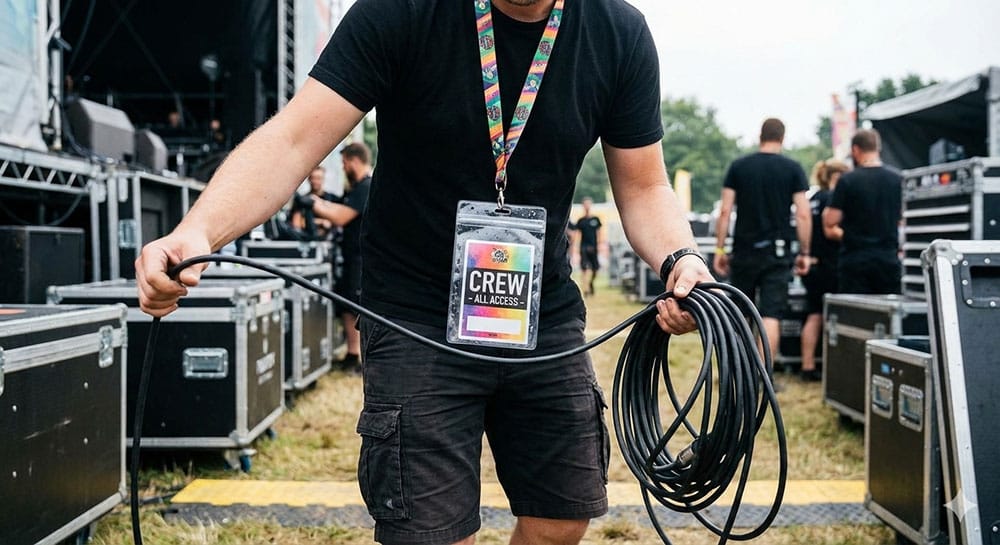
Large passes such as A6 are ideal for crews, music event, backstage access and alike.
A6 (large pass size)
- Dimensions: 105 × 148 mm.
- Best for: High‑visibility events, crews, backstage, multi‑day passes.
A6 is what you choose when visibility matters. You get a bigger branding area and far better readability from a distance, which is useful when multiple details must be shown (zone access, dates, sponsor branding).
Good to know: A6 is normally used with a clear plastic wallet or pouch to keep edges tidy and protect print.
Custom lanyard card sizes
Custom sizes crop up when you’re matching an existing system (specialist access formats), producing multi‑part passes (tear‑off stubs/vouchers), or working to a venue’s internal credential template.
If you already have a format in use, confirm the exact dimensions and whether the wallet/holder is sold by overall size or insert size.
Types of lanyard cards
If you’re unsure what to choose, make one decision first: does the card need to be durable (PVC) or changeable (printed insert)? That single choice usually determines everything else.

Staff ID lanyard cards and access cards are usually credit card size and clipped into a plastic holder attachment.
Staff ID cards
Designed for daily wear. The priorities are durability, a professional finish, and quick identification. You’ll typically include a photo, name, role, branding and an ID number. For carry, CR80 cards are usually slot‑punched or used with a slim holder.
Access control cards
These are function-first. They may look like staff ID cards, but the technology matters (RFID/NFC, magnetic stripe, barcode/QR). If the card is being scanned or swiped constantly, a holder is often the smarter option because it reduces wear and helps prevent cracking.
Event passes
Event passes need to be readable at a glance and easy to replace. You’ll typically see attendee name/company, event branding, dates, a QR code and an access level. They’re commonly carried in A6/A7 wallets or pouches, especially where passes are issued in bulk and details may change.
Visitor badges & temporary passes
These are all about speed and flexibility. Most include name, company, date/time, host and a visitor category. A wallet with a paper or printed insert keeps the process simple when you’re issuing lots of passes.
Materials and print options for your lanyard card
The right material depends on how long the card needs to last, how rough the environment is, and whether it will be scanned repeatedly.
PVC cards
- Best for: Daily use, staff IDs, access cards.
PVC is the durable, professional option. It holds colour and photos well and it’s the usual choice where access technology is involved.
Laminated card inserts
- Best for: Events, visitors, short‑term credentials.
Laminated inserts are cost‑effective in volume, easy to reprint when details change, and ideal when the card will live inside a wallet or pouch.
Synthetic papers and water‑resistant stocks
- Best for: Outdoor events, sites where moisture is likely.
Synthetic stocks are a good middle ground: you still get the flexibility of inserts, but with far better resistance to rain, handling and general wear.
Print considerations
- Start with readability: Strong contrast for names and roles (especially at 1–2 metres).
- Then protect scannability: Give QR codes enough space and avoid heavy gloss glare where you can.
Once those basics are nailed, you can focus on the finishing touches like matching brand colours across the lanyard and card so the whole setup looks intentional.
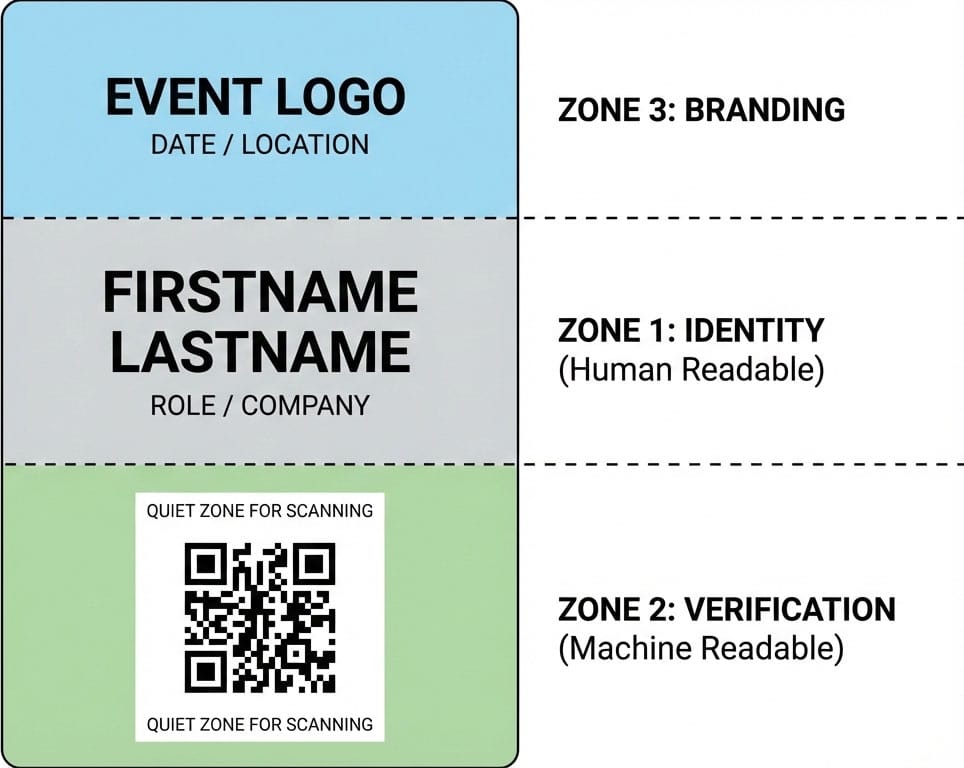
When designing your lanyard card it can often be sectioned into zones for name, logo and QR code.
Lanyard card templates and artwork setup
If you want this to run smoothly at scale, the easiest win is getting the artwork spec right before anyone starts personalising names. At a minimum, confirm the final trim size (CR80/A7/A6), the intended orientation (portrait vs landscape), and a sensible safe area so nothing important sits on the edge.
If you’re using QR codes or barcodes, treat them like functional elements rather than decoration: give them a dedicated zone and keep a clean quiet zone margin so they scan first time.
Finally, be clear about the workflow. Are inserts being printed centrally, in‑house, or issued on‑site at an event? That decision affects how you build the layout and how much flexibility you need.
Pro tip: if the project includes variable names/roles, build a layout where the name block can expand without breaking the design.
How lanyard cards are carried and displayed
Most setups boil down to the same three approaches. Pick the one that matches how the card will be used day‑to‑day.
Slot‑punched and clipped directly
- Best for: CR80 cards, everyday staff use.
This is the cleanest setup with minimal bulk and quick to present for checks. The trade‑off is general wear. If the card flexes or catches repeatedly, it can crack over time. If it’s worn daily and frequently presented, a slim holder is often the safer long‑term choice.
Inside a clear wallet (soft holder)
- Best for: A6/A7 passes, events, visitor credentials.
A PVC clear wallet protects edges and print, and it makes insert swaps painless when you’re issuing passes quickly or updating details last minute.
Inside a pouch (sealed / protective)
- Best for: Outdoor events, wet environments, higher wear.
A pouch is the belt and braces option. It’s there to protect against rain, dust and heavy handling.
Where ‘lanyard card with clip’ fits
Some products described as ‘lanyard cards with clip’ are reference or information cards supplied with a clip so they can be attached directly to a branded lanyard. These are common where the content needs to be instantly accessible (for example, training prompts, site instructions, or quick reference cards).
Lanyard card specs that prevent costly mistakes
This is the section we’ve noticed that most guides miss. Notably, it’s also the one that stops your project going sideways.
| Specification | CR80 / ID-1 | A7 / ID-2 | A6 | Why it matters |
| Finished size | 85.60 × 53.98 mm | 74 × 105 mm | 105 × 148 mm | Determines layout, readability, and wallet fit |
| Typical orientation | Landscape | Portrait or landscape | Portrait or landscape | Affects name block, branding, and scan zone |
| Recommended safe area | Keep text inboard | Keep text inboard | Keep text inboard | Avoids trimming/edge distortion |
| QR / barcode placement | Lower corner / dedicated zone | Dedicated zone | Dedicated zone | Protects scannability in crowded layouts |
| Carry method | Slot/holder | Wallet/pouch | Wallet/pouch | Impacts durability and user experience |
Practical note: Wallets and pouches are often sold by insert size and orientation. A7 wallet can mean different things depending on whether the supplier is referencing the insert or the overall outer dimensions.
Avoiding common purchasing mistakes
- Ordering the right size in the wrong orientation. A7 and A6 can be portrait or landscape; your artwork needs to match the intended wallet.
- Assuming “A7” describes the outer wallet size. Many are specified by insert size, so always confirm.
- Making QR codes too small. If check-in depends on scanning, give the code a dedicated area and don’t squeeze it into a corner.
- Using glossy finishes under harsh lighting. Glare can reduce scannability.
- Slot-punching PVC without thinking about wear. If it’s worn daily, a holder often extends the life of the card.
Wallets and holders fit and orientation
You don’t need to obsess over product jargon, you just need to confirm the fit and the orientation.
Sizes and fit for lanyard cards
| Card / insert size | Typical use | Most common orientation | Notes |
| CR80 / ID-1 (85.60 × 53.98 mm) | Staff ID, access cards | Landscape | Often slot-punched; slim holders reduce cracking |
| A7 / ID-2 (74 × 105 mm) | Conferences, visitor passes | Portrait (common), landscape (also used) | A7 = ID-2 when rotated; wallets may be sold by insert size |
| A6 (105 × 148 mm) | High-visibility passes, crew | Portrait (common), landscape (also used) | Bigger wallets can swing more; choose lanyard width accordingly |

Temporary visitor passes are a common use for PVC wallets and printed lanyard card inserts.
Everyday lanyard card uses and what works best
Workplaces and access-controlled buildings
- Typical setup: CR80 staff card and breakaway lanyard and slot punch/holder.
- Why: Compact, professional, designed for repeated daily use.
Events, conferences and exhibitions
- Typical setup: A7 or A6 pass and wallet.
- Why: Readable at a distance, easy to replace, simple to manage in bulk.
Healthcare and education
- Typical setup: CR80 card and breakaway lanyard and holder.
- Why: Safety features matter and cards get heavy daily handling.
Construction sites, warehouses and outdoor venues
- Typical setup: Pass and pouch (if exposed) or wallet (if indoors).
- Why: Durability and protection become the priority.
Commonly asked questions
About the author